

Google Cloud Security: Top Misconfigurations We Still Find in 2026
The Security Posture Gaps Behind Most Cloud Incidents
Cloud adoption is accelerating: elastic capacity, managed services, faster releases, and a smaller operations footprint make it appealing to businesses of all sizes. But the same speed and self-service that make the cloud powerful also make it easy to ship insecure infrastructure at scale.
What we see in real environments aligns with broader threat intelligence. Google Cloud’s Threat Horizons research shows that “weak or absent credentials” and “misconfiguration” remain among the most frequently observed initial access vectors into cloud environments: nearly half of observed incidents involved weak or absent credentials, with misconfigurations close behind.
The cost of getting cloud security wrong is high. IBM’s Cost of a Data Breach reporting has consistently shown multi-million-dollar average breach impacts. And exposure mistakes still happen at scale: Tenable’s 2025 research found that 9% of publicly accessible cloud storage contained sensitive data, and 97% of that sensitive data was classified as restricted or confidential.
This is why “cloud security” is rarely about exotic exploits. After running multiple Security Posture Assessments (SPA) across different environments, our team noticed the same pattern: most cloud risk is caused by configuration decisions that unintentionally introduced security gaps.
This article breaks down the most common security misconfigurations we continue to see in cloud environments, why they matter, and what you should fix early before they become real problems.
1. Public Exposure of Critical Resources
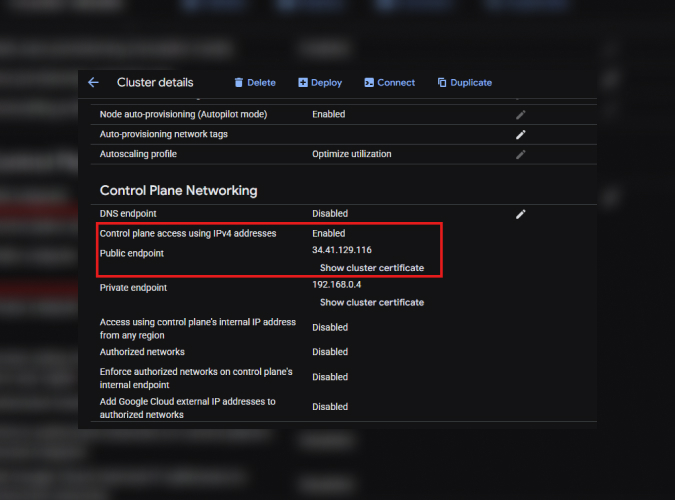
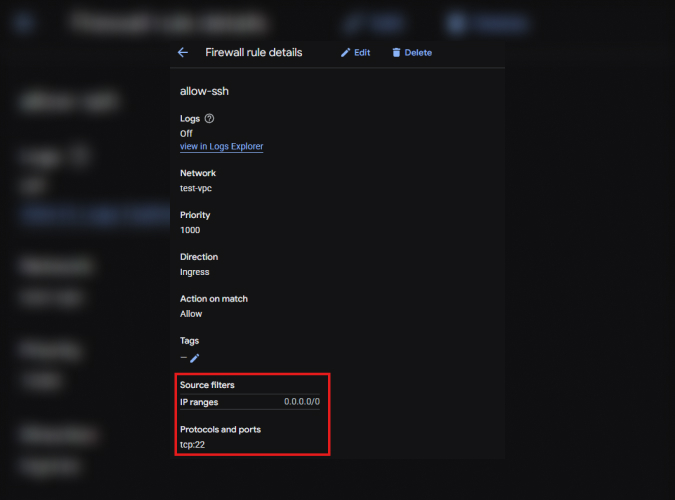
We consistently find databases reachable from public IPs, compute instances open to the internet, and even Kubernetes clusters with public endpoints enabled. In some cases, firewall rules allow access from anywhere (0.0.0.0/0), essentially leaving the front door open.
The risk here is straightforward: once a resource is public, it becomes part of the global attack surface. Automated scanners will find it, and credential-stuffing, exploit attempts, and brute-force traffic tend to follow quickly. You can see how this is a real threat in our article Any Public IP Is a Target: Lessons From a Google Cloud Honeypot Deployment.
Figure 1: Example of a SQL instance with public IP configuration.
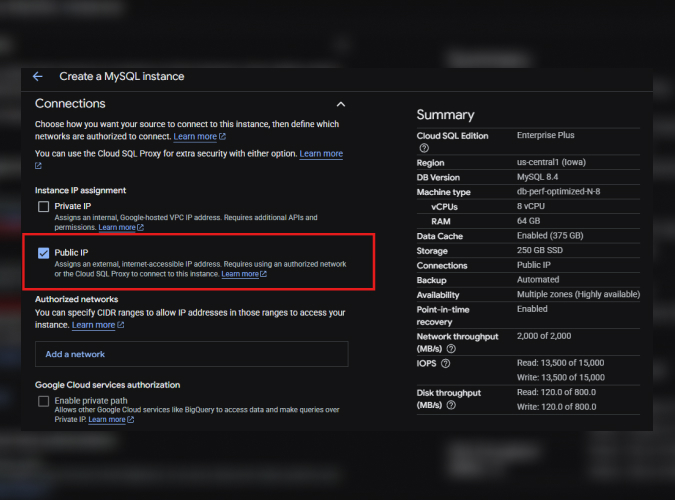
Figure 2: Example of a Kubernetes Cluster that is running on a Public Endpoint
Why this happens?
Teams prioritize connectivity during early deployments. Opening access “temporarily” often turns into a permanent configuration that nobody revisits.
How to fix it:
Start private by default. Use private IPs for Cloud SQL, private clusters for GKE, and restrict ingress with authorized networks. If external access is required, route it through controlled entry points like load balancers, VPNs, or Identity-Aware Proxy.
A good rule: if something doesn’t absolutely need the internet, it should never see the internet.
Google Cloud-specific guardrails that can help early:
Enforce org-level restrictions that prevent public IP configurations where possible (for example, Cloud SQL public IP restrictions and controls that limit VM external IP assignment).
Use Security Command Center posture signals (including Security Health Analytics) to continuously surface exposures and misconfigurations as they happen, not months later.
Treat “internet reachable” as a design decision requiring explicit review, threat modeling, and compensating controls (WAF, rate limiting, strong identity, and logging).
If you eliminate unintended public exposure early, you remove a whole category of opportunistic attacks before you even get to “advanced security.”
2. Overprivileged Service Accounts and IAM Roles
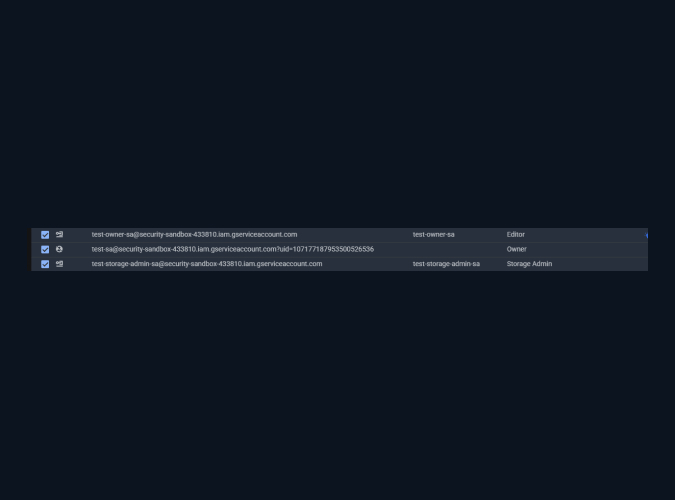
We frequently encounter service accounts with admin-level roles, primitive roles like Owner or Editor, and identities holding permissions far beyond what their workload requires.
IAM is often called the modern firewall because a successful breach of it can completely expose an entire company. Most breaches don’t start with zero-days — they start with overly permissive IAM.
Figure 3: Primitive/overpermissive role examples
Why this happens?
Someone grants broad access to unblock a deployment, and the role stays forever because “nothing is broken.”
How to fix it:
Enforce least privilege from day one. Use predefined roles instead of primitive ones. Prefer granular permissions. Audit service accounts regularly and remove anything that isn’t actively required.
IAM is not a one-time setup. Treat it as a living control.
Google Cloud-specific hardening moves we recommend:
Use IAM Recommender/IAM insights and identity findings to identify and remove excessive permissions over time (especially for long-lived service accounts).
Reduce long-lived credentials: minimize or prohibit service account key creation where feasible, and prefer workload identity approaches (short-lived tokens, controlled issuance) over downloadable keys. Organization policies can help enforce this at scale.
Segment by environment and trust boundary: production projects should not inherit broad permissions granted for dev/test convenience.
Overprivilege turns small mistakes into organization-wide incidents. Least privilege is the cheapest control you’ll ever deploy if you actually maintain it.
3. Unrestricted Administrative Access Paths (SSH/RDP/FTP)
Open SSH and RDP rules continue to appear in firewall configurations, sometimes globally allowed instead of restricted to corporate ranges.
Figure 4: Example of default rule “allow-ssh.”
Why this happens?
Operational convenience. Engineers want quick access to troubleshoot or deploy.
How to fix it:
Never expose management ports broadly.Use Identity-Aware Proxy, bastion hosts, or VPN-based access instead. Restrict firewall rules to trusted IP ranges only, and remove rules that are no longer needed.
Google Cloud-specific approaches that reduce risk without killing productivity:
Use IAP TCP forwarding to reach VMs without public IP addresses, and control access via IAM rather than internet-exposed ports.
Centralize and standardize access paths (IAP/VPN/bastion) so “just open 22 to the world for a minute” isn’t even an option.
Pair restricted access with strong identity controls (MFA, device posture where applicable) and ensure access is logged and reviewable.
If you can reach it with a browser or a tunnel that enforces identity, you usually don’t need to reach it with an internet-open port.
4. Storage Buckets and Data Controls Misconfigured
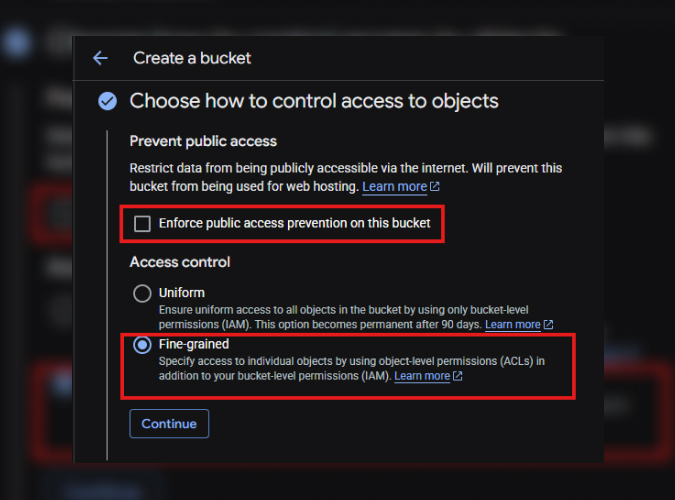
We often identify storage buckets with overly permissive policies or configurations that allow broader access than intended. Once data becomes publicly reachable, the damage is already done.
Why this happens?
Misunderstanding inheritance and IAM interactions within storage policies is extremely common, especially in fast-moving teams.
How to fix it:
Enforce uniform bucket-level access when possible, review policies regularly, and avoid granting broad roles at the project level.
Monitor your buckets; logging and retention policies are not just compliance checkboxes — they are visibility mechanisms.
NB: this category of misconfigurations is usually behind the real-world incidents.
Cloud storage tends to become the “default landing zone” for exports, logs, analytics extracts, model artifacts, and ad-hoc file sharing. Over time, bucket policies quietly accumulate exceptions, and it only takes one public exposure to create a material data leak.
Google Cloud-specific reinforcements we commonly implement:
Baseline org policies for public access prevention and consistent access controls, so teams cannot unintentionally publish sensitive objects.
Standardize data classification and apply differentiated controls (e.g., stricter policies for regulated datasets, tighter sharing constraints, stronger monitoring).
Make “public object access” an alert-worthy event with clear ownership and a defined response playbook.
Storage misconfigurations are rarely “just storage.” They are often the incident itself because data exposure is the outcome that attackers want.
5. Encryption and Secure Transport Not Fully Enforced
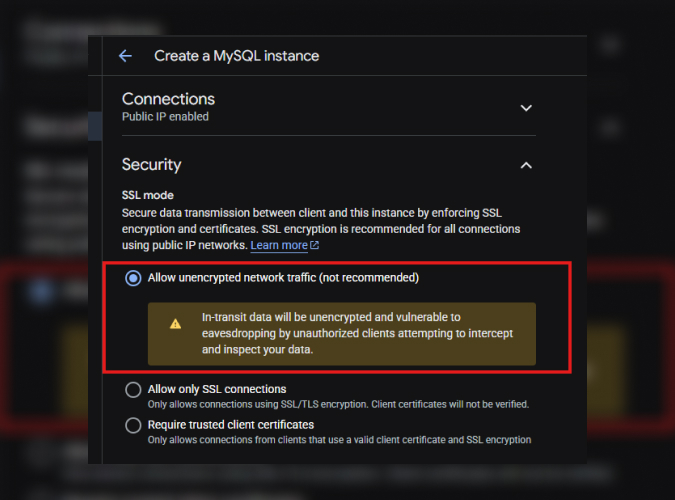
One of the quieter but high-impact issues is databases running without SSL or workloads communicating without enforced encryption.
Data in transit that isn’t encrypted is vulnerable to interception. It’s a preventable risk.
Figure 6: misconfiguration when creating SQL instance, allowing unencrypted traffic.
Why this happens?
Encryption is often assumed to be “handled by the cloud,” but many services still require explicit configuration.
How to fix it:
Enable SSL/TLS for databases, enforce secure connections from clients, and validate encryption settings during deployment, not after.
Even with built-in security features available, encryption should always be explicitly verified as part of deployment and configuration.
Where teams usually get surprised in practice:
“Encryption at rest” is not the same as “encryption in transit.” You need both, and you need to verify client behavior (drivers, connection strings, TLS modes), not just server settings.
Legacy apps and migration tooling can silently downgrade transport security unless you explicitly enforce it and test it.
If a workload handles credentials, PII, financial records, or proprietary data, “TLS everywhere” should be a build-time requirement, not a backlog item.
Your Path to a Stronger Cloud Security Starts With Strong Foundations
Cloud security is not just about defending against advanced exploits. It also depends on strong controls and consistent operational discipline. Put guardrails in place, such as organization policies, IaC policy checks, and continuous posture monitoring, so the secure option becomes the default.
Teams that establish these measures early can reduce avoidable rework and make it easier to maintain a secure environment over time.
If you are new to GCP, one of your biggest advantages is the opportunity to build securely from the start. And if you’re not new, it is never too late for a posture review.
At Zazmic, we help organizations identify these gaps before attackers do through structured Cloud Security Posture Assessments, paired with actionable remediation guidance from security engineers.
If you want a clear view of your current Google Cloud risk and a prioritized, engineer-ready roadmap to fix it, book a call with our team. We’ll walk through your environment, highlight the highest-impact exposures, and map remediation to practical GCP-native controls.