
Cryptojacking remains a persistent cloud threat because it offers attackers an immediate, low-friction way to monetize unauthorized access, often racking up hundreds of thousands of dollars in compute fees within hours. Since a miner is typically a symptom of a deeper root-level compromise, rapid detection is critical to preventing further data exfiltration or ransomware deployment. This guide provides a manual, CLI-first approach to identifying these intrusions across Linux VMs, containers, and Kubernetes environments using forensic system indicators.
Cryptomining-driven compromises (often known as cryptojacking) remain a persistent cloud threat because it’s an unusually “clean” way for attackers to monetize access: no data to fence, no negotiations, and, if done well, minimal immediate disruption. The result is a class of intrusions that can hide in plain sight inside legitimate compute, container, and Kubernetes workloads.
The scale of the problem grows every year. A single attack can cost more than $300,000 in cloud compute fees. At the same time, modern cloud intrusions are fast: Sysdig’s threat research has repeatedly highlighted that attackers can move from initial access to impact in ~10 minutes or less, and resource-jacking campaigns can rack up tens of thousands of dollars in cloud costs in hours.
Crucially, the presence of a miner is rarely the endgame; it is a symptom of a root-level compromise. If an adversary has the access required to install mining software, they possess the privileges to exfiltrate sensitive data, destroy infrastructure, or deploy ransomware. Mining is simply the most immediate way to monetize that access.
In this article, we’ll take a manual, CLI-first approach to detecting miners across:
Linux VMs (e.g., Compute Engine)
Containers (Docker or containerd environments)
Kubernetes / GKE.
The goal is to detect miners without relying on managed security tools, using observable system behavior and forensic indicators. This approach is useful when you’re in an incident, validating a suspicion, or you need high-confidence evidence before taking containment actions.
What Is Cryptomining and Cryptojacking
Digital currencies are often distributed as incentives to those who maintain decentralized blockchain networks. By dedicating processing power to verify and record transactions, participants receive rewards. This activity (cryptomining) can be legitimate.
However, in cloud incidents, the common pattern is unauthorized mining, also known as cryptojacking. This is a process in which the attacker runs a miner on your compute and keeps the rewards while leaving you with the infrastructure costs and performance degradation.
One widely recognized application for this is XMRig, commonly used for mining privacy-focused coins like Monero. Modern versions of XMRig are frequently packaged as Docker containers, allowing operators to pull the software from public registries and launch it with minimal effort.
In a nutshell, cryptojacking is “compute hijacking”: theft of your cloud resources (CPU/GPU, bandwidth, and spending) by running mining workloads without authorization.
Why Cryptominers Show Up So Often in Cloud Breaches
Once an attacker gets any foothold (stolen credentials, exposed admin endpoints, vulnerable internet-facing services, or an overly-permissive Kubernetes configuration), mining is one of the fastest ways to monetize. In container and Kubernetes environments, cryptomining campaigns frequently deploy miners through automated scripts that:
pull a miner image or drop a static binary,
join a mining pool immediately,
attempt persistence (cron, systemd, DaemonSets/CronJobs),
and then move laterally to scale.
Research by Datadog keeps pointing to cloud and container-centric attack paths where adversaries exploit exposed management interfaces (like Docker APIs) and then quickly monetize by spinning up a containerized workload. And if you want a big-picture view of the current state of cybersecurity, this article will walk you through the current trends and ways to keep your business safe in 2026.
Hands-On Cryptomining Detection Workflow
Detecting miner activity
Cryptomining remains one of the most common post-compromise activities in cloud environments. Attackers monetize access by deploying CPU- or GPU-intensive miners that often blend into legitimate workloads, especially in Kubernetes and autoscaled environments.
Detection philosophy: what “good” looks like
Manual miner detection works best when you compare “now” to an expected baseline:
Workload intent: Is this VM/node supposed to be CPU-bound? At this time of day?
Process lineage: Where did the process originate (systemd, cron, kubelet, user shell)?
Network behavior: Are there persistent outbound connections to unknown endpoints?
Persistence: Does it survive reboots/reschedules? Is there controller-level re-creation?
If you don’t have that baseline, you can still hunt effectively, just treat every finding as “suspicious until explained,” and validate against deployment intent, change history, and ownership.
How to spot miners
Both incident research and our experience suggest that most cloud cryptominers share common traits:
Sustained high CPU or GPU utilization
Long-running processes with misleading names
Outbound connections to mining pools
Persistence mechanisms (cron, systemd, Kubernetes controllers)
Fileless or memory-resident execution.
Note: High CPU alone is not proof of mining. Build confidence by correlating process behavior, network destinations, and persistence. Also, preserve evidence where possible (logs, process command lines, container images, disk snapshots) before cleanup.
XMRig remains a frequent choice of attackers because it’s widely available and easy to deploy (often via containers). SonicWall specifically called out XMRig as the dominant tool in cryptojacking and as a common cryptominer seen in cloud incidents and campaigns.
OS Level Indicators
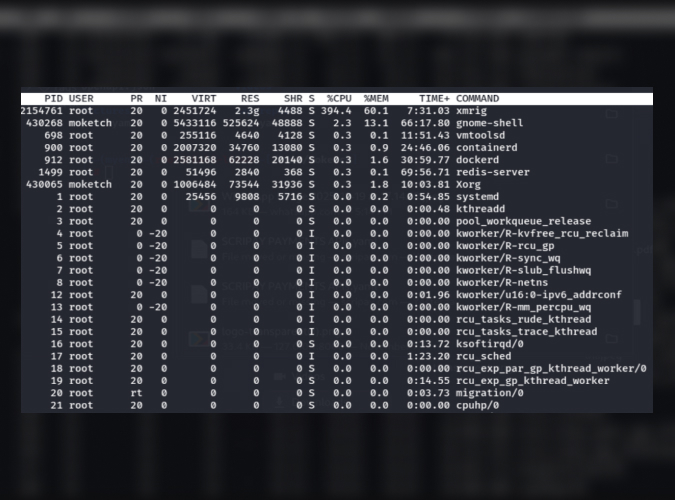
Run the command:
# top -o %CPU
Take note of:
One or more processes consuming 80–100% CPU continuously
CPU usage does not correlate with expected workload
Load average significantly exceeds vCPU count.
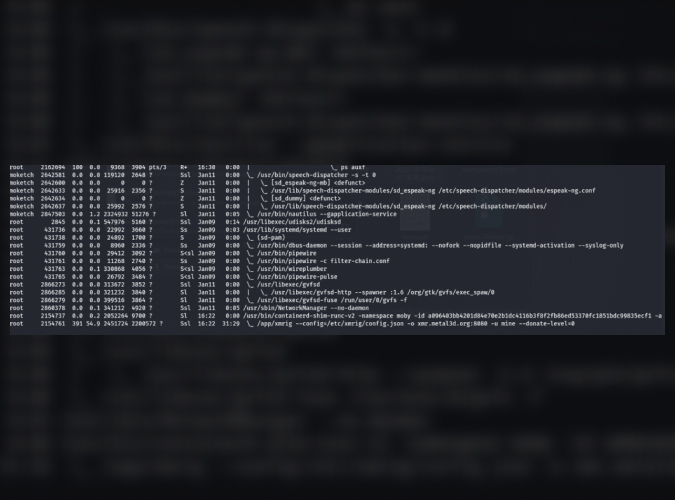
List all processes with full command-line arguments:
#ps auxf
Look for:
Processes running as root
Unexpected binaries in /tmp, /dev/shm, /var/tmp
Obfuscated arguments or base64 blobs.
Suspicious binary can be seen on the last line.
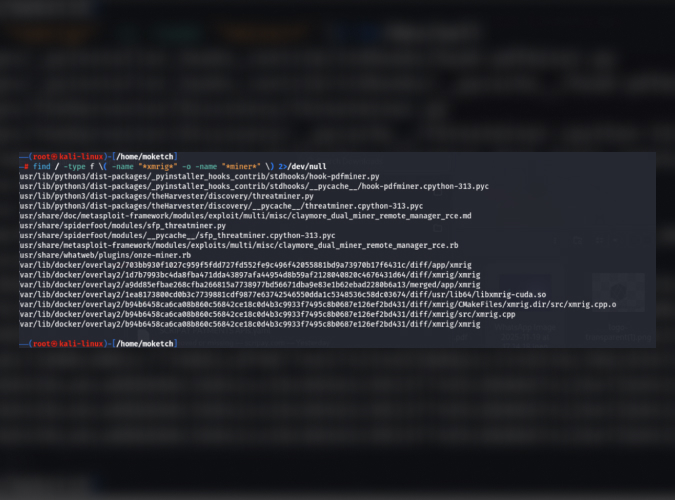
Check for Miner Signatures
Check the file system for miner binaries:
# find / -type f \( -name "*xmrig*" -o -name "*miner*" \) 2>/dev/null
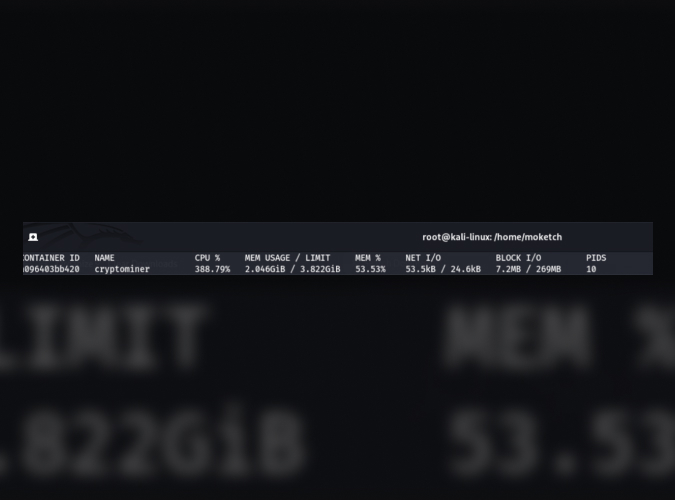
Detect Cryptomining in Containers
List resource-heavy containers:
#docker stats
Investigate the miner inside the suspicious container:
#docker exec -it <container_id> sh
#ps aux
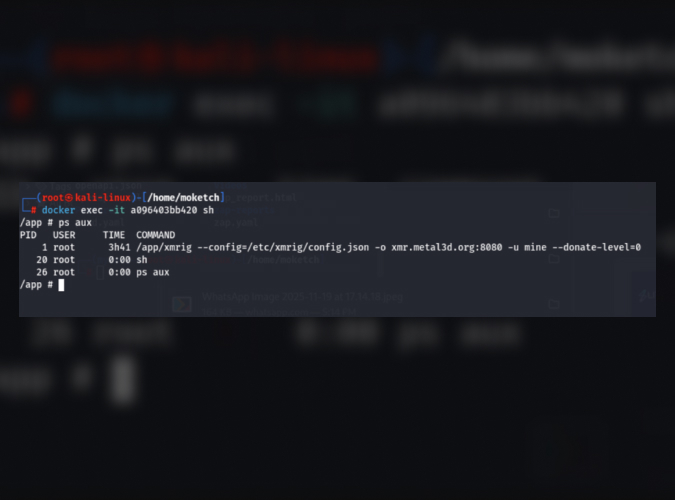
Kubernetes-Level Detection
Check for node CPU usage:
#kubectl top nodes
#kubectl top pods --all-namespaces
Look for:
Pods consuming disproportionate CPU
Names mimicking system components.
OS Level checks
1. Fileless & memory-based execution:
#ls -la /dev/shm
Inspect deleted but running binaries:
#lsof | grep deleted
2. Check for persistence via cronjobs:
#crontab -l
#ls -la /etc/cron*
Look for:
Base64-encoded commands
curl | bash
Hidden jobs running every minute.
3. Inspect Active Network connections:
#ss -tunap
Look for:
Persistent outbound connections
High packet volume
Connections to unfamiliar IPs or domains
Note: Cryptominers typically use TCP ports 3333, 4444, 5555, 7777.
Why Detecting Cryptomining Is Critical
You may have heard that abusing cloud infrastructure for illicit mining is extremely inefficient for attackers: hundreds of thousands of dollars in compute and cloud resources may be consumed to produce only a few thousand dollars’ worth of cryptocurrency.
Despite this imbalance, cryptojacking continues to be attractive because it shifts the financial cost and legal risk entirely to the victim. As a result, unauthorized mining remains a leading attacker objective, alongside a noticeable rise in supply-chain compromises and geopolitically motivated activity.
Most importantly, you must treat a cryptomining infection as a full breach. If an attacker can execute code to mine, they can also access your databases, steal your secrets, and pivot to other parts of your cloud environment.
What To Do When You Confirm a Miner?
Detection is only useful if you can convert it into decisive containment, especially given how quickly attackers can operationalize cloud access. A practical response sequence typically looks like this:
Contain
Quarantine the VM (restrict egress; isolate via firewall rules/VPC controls).
In Kubernetes, cordon/drain affected nodes (carefully) and isolate the namespace/workload from the outbound internet where feasible.
Preserve evidence
Capture process trees and command lines (ps auxf output, /proc/<pid>/cmdline).
Record network connections (ss -tunap) and DNS resolution behavior (if available).
Preserve suspicious binaries and container image references (image name + digest).
Eradicate
Remove persistence (cron/systemd units; K8s controllers/CronJobs/DaemonSets).
Patch the initial entry point (misconfiguration, exposed API, vulnerable service).
Rotate credentials and keys, especially if compromise involved tokens, kubeconfigs, or service accounts.
Prevent recurrence
Lock down exposed management surfaces (e.g., Docker API, unauthenticated dashboards).
Enforce least privilege and workload identity patterns.
Add egress controls and allowlists for high-risk environments (build, CI, “tools” namespaces).
If you want a structured, Google Cloud–native approach for broader detection coverage on Compute Engine, Security Command Center’s cryptomining best practices (and the associated Cryptomining Protection Program eligibility requirements) are worth reviewing.
Closing perspective from Google Cloud security teams
Cryptomining is rarely “just mining.” In real intrusions, it’s often a symptom of something bigger: exposed credentials, unsafe network exposure, lax container controls, or supply-chain risk. The CLI workflow above is designed to help you triage quickly, validate what’s happening at runtime, and preserve enough context to fix the root cause, not just kill the process.
If you need to harden your Google Cloud environment, build a repeatable detection playbook for GKE and Compute Engine, or run a cloud-focused incident response and threat hunt - Zazmic is here to help.
Our team of seasoned experts will review your environment and suggest the fastest paths to measurable risk reduction.